Showing posts with label Android. Show all posts

Sunday, 26 October 2014

10 सबसे ज्यादा बिकने वाले स्मार्टफोंस 2014 (Above ₹ 25,000/-)

स्‍मार्टफोन मार्केट में इतनी तेजी से आ रहे हैं कि ये सोंचने का मौका ही नहीं मिलता की कौन सा स्‍मार्टफोन लिया जाए जब तक आप कोई स्‍मार्टफोन लेने का मन बनाएंगे उससे अच्‍छे फीचर और कम दाम वाला फोन मार्केट में आ चुका होगा। लेकिन इसके बाद भी कुछ हैंडसेट ऐसे है जिनकी डिमांड काफी समय तक मार्केट में बनी रहती है। एचटीसी और एपल के हैंडसेट इस रेंज में सबसे आगे हैं। चलिए नजर डालते हैं कुछ ऐसे स्‍मार्टफोन्‍स पर जो मार्केट में कई महिनों से नंबर वन हैं। यानी ये वो स्‍मार्टफोन्‍स हैं जो मार्केट में सबसे ज्‍यादा बिकते हैं।

LAST UPDATE: 2:34 PM 26/OCT/2014

1. Apple iPhone 5S (Gold, with 16 GB)
₹ 42,990/-
Smarter Multitasking
AirDrop and Control Centre
1.2 MP FaceTime HD Camera
Touch ID: New Fingerprint Identity Sensor
A7-chip High Performance 64-bit Architecture
and M7 Motion Co-processor
8 MP iSight Camera with 15% Large Images Sensor and Aperture of f/2.2
Ultra-fast Wireless
Apple Apps: iPhoto; iMovie; Keynote; Pages and Numbers

2. Google Nexus 5(Black, with 16 GB)
₹ 27,932/-
Android v4.4 (KitKat) OS
4.95-inch Full HD IPS Touchscreen
2.3 GHz Qualcomm Snapdragon 800 Processor
8 MP Primary Camera
NFC Support and Built-in Wireless Charging
Wi-Fi Enabled and 2 GB RAM
16 GB Internal Storage

3. HTC Desire 816
₹ 25,499/-
5.5-inch Touchscreen
13 MP Primary Camera
Wi-Fi Enabled
Expandable Storage Capacity of 128 GB
5 MP Secondary Camera
Full HD Recording
Android OS
1.6 GHz Qualcomm Snapdragon 400 Quad Core Processor

4. HTC One M8
₹ 36,499/-
Android OS
2.5 GHz Qualcomm Snapdragon 801 Quad Core Processor
Full HD Recording
5-inch Touchscreen
HTC UltraPixel Primary Camera
Wi-Fi Enabled
5 MP Secondary Camera
Expandable Storage Capacity of 128 GB

5. Samsung Galaxy S5
₹ 36,999/-
Android KitKat OS
Your Finger is Your Key - Finger Scanner
Ultra Power Saving Mode
Adonis Prime2 (Quad 1.9 GHz + Quad 1.3 GHz) + XMM6360 Processor
Fast Auto Focus and Selective Focus
16 MP Primary Camera
IP67 Certificated Dust and Water Resistant
Android v4.4.2 (KitKat) OS
Healthier Lifestyle - Heart Rate Sensor

6. Samsung Galaxy Note 3 N9000
₹ 39,500/-
Android v4.3 (Jelly Bean) OS
Octa Core Processor (1.9 GHz Quad + 1.3 GHz Quad) and 3 GB RAM
Dual Camera: Dual Shot / Dual Recording / Dual Video Call
13 MP Primary Camera with Auto Focus and BSI Sensor
2 MP Secondary Camera with Smart Stabilization and BSI Sensor
S Pen Optimized Features: Air Command; Action Memo; Scrapbook; S Finder; Pen Window; Multi Window; Direct Pen Input
NFC Support
Full HD (1080p) Recording and Playback Support
5.7-inch Full HD Super AMOLED (1920 x 1080) Display
Samsung Smart Scroll and Samsung Smart Pause
Air Gesture and Air View

7. Lenovo K900(Steel Grey, with 32GB)
₹ 27,159/-
Android v4.2  OS
13 MP Primary Camera
2 MP Secondary Camera
32 GB Internal Memory
5.5-inch LCD Capacitive Touchscreen
Full HD Recording
Wi-Fi Enabled
Android v4.2 (Jelly Bean) OS
2 GHz Dual Core Processor

8. Sony Xperia Z
₹ 28,899/-
Dual Exmor-R for Mobile Camera
Screen as impressive as HDTV - Full HD Reality Display
Quad-core Processor
One-touch Functions
Image Sensor with HDR Video for Smartphones
Water and Dust Resistant
Less Reflective; More Responsive - OptiContrast
From Smartphone to Big Screen

9. Nokia Lumia 1020
₹ 27,999/-
Windows 8 Operating System
Music apps: Nokia Music; Mix Radio
Comes with MS Office and Free Voice-guided Navigation
41 MP Primary Camera with PureView technology and Optical Image Stabilisation
1.5 GHz Qualcomm Snapdragon S4 Dual Core Processor
Powered by Windows Phone 8.1 OS and 2 GB RAM
Carl Zeiss Tessar lens
Full HD (1080p) Recording
Wireless Charging
1.2 MP Secondary Camera

10. LG G3 D855
₹ 39,999/-
Android v4.4.2 (KitKat) OS
5.5-inch LCD Capacitive Touchscreen
13 MP Primary Camera
Android v4.4.2 (KitKat) OS
2.1 MP Secondary Camera
2.5 GHz Qualcomm Snapdragon Quad Core Processor
Expandable Storage Capacity of 128 GB
Wi-Fi Enabled

Monday, 30 September 2013

How to Root SAMSUNG S4 MINI i9192 Jelly Bean 4.2.2

I AM NOT RESPONSIBLE FOR ANY DAMAGE IN YOUR DIVICE OR ANY THING. DO AT YOUR OWN RISK.


IT IS ONLY FOR SAMSUNG S4 MINI i9192 Jelly Bean 4.2.2. PLEASE DON'T TRY IN ANY OTHER MODEL.


Only tested on INS-I9192DDUAMH3-20130902150912 stock rom, should work on other roms for i9192. do at your own risk, i am not responsible.


(1). Install Samsung Kies if you don't have already. from here    


(2). Enable USB Debug mode on your S4 Mini i9192

(3). Copy "GT-I9192-RootKit-v2.zip" file to root directory of mobile's ExtSDCard

(4). Run "Odin3 v3.07.exe" in Administrator mode.

(5). Shut Down your i9192 and reboot in Download Mode (to do so press VOL Down + Home + Power On Button Together).

(6). Connect Your Mobile to PC Via USB, Press VOL-UP Button. Download Mode will start.

(7). If everything goes right ODIN will display com port, turns green.

(8). Click on PDA Button and select "ROOT_I9192_CWM6_Kernel.zip" from the file which you've extracted earlier.

(9). Click Start. and let ODIN do its job. device will reboot it self and vibrates immidiatly press VOL-UP + Home + Power Button

together. Device will boot in recovery mode. [Do not remove USB Cable].

(10). wipe data/ factory reset.

(11). choose install zip from sdcard, locate and choose file "GT-I9192-RootKit-v2.zip" which you've copied earlier.

(12). reboot system.

And you're done! now you have rooted S4 Mini i9192.
_____________________________________________________________________

Check if Wifi is working? if working no need to do anything. if not, do blow steps.

(13). Shutdown and reboot you device in download mode (to do so press VOL Down + Home + Power On Button Together).

(14). Start Odin, Connect Mobile to PC via USB cable, press VOL-UP Button. Odin will turn green and display port number.

(15). Click on PDA and choose "KERNEL-SLK-I9192DDUAMH3-1377092848.tar" from the files you've downloaded.

(16). Click Start and and let ODIN do its job. device will reboot it self. after device restarted remove usb cable. and check is WiFI is

working or not. Should work fine.


# if you stuck in some kind of booting loop, reboot device in recovery mode (VOL-UP + Home + Power Button ) and wipe data/

factory reset. and reboot.


Above method is tested by me on me S4 Mini i9192.


Best regards,
AMIT KUMAR KHARE

Sunday, 23 June 2013

How to Root Samsung Galaxy Chat B5330 - ICS


 Do at Your Own Risk

Might not work on Jelly Bean Update.

Samsung’s entry-level Android ICS Device, the Samsung Galaxy Chat B5330, debuted in August this year and with that, it brought a choice for beginners to choose their next ICS device. The phone brings a physical QWERTY keypad along with a nice set of hardware to meet the requirements of a heavy chatter. No matter what great features the device comes with, the real potential can only be unlocked by rooting the device. To root your Samsung Galaxy Chat B5330 device, you can follow our guide.
By editandroid.blogspot.com

I. Before You Begin:

1. Rooting voids the warranty of your device (until you unroot it).
2. Please charge your device to have at least 60% of battery life left.

II. Downloading Required Files:

1. Root Package (Download link’s given in the first post, under Rooting section)

III. Rooting the Samsung Galaxy Chat B5330:

1. Download and place the Root Package file onto your Desktop. Do NOT extract it.
2. Connect your device to your PC using the USB cable.
3. Copy the Root Package file over to the SD card of your device.
4. Once done, disconnect the device from your PC.
5. Turn OFF the device.
6. Reboot the device into Stock Recovery. To do so, press and hold the Volume Up+Home+Power buttons together.
7. Once inside the recovery, choose apply update from sdcard.
8. Select the Root Package(update.zip) you copied earlier to the device.
9. Be patient and let it root the device.
10. Once done, reboot the device.
11. You’re good to go!
Brilliant! You now have root access on your Galaxy Chat B5330 device

How To Unroot Samsung Galaxy Chat B5330
Samsung Galaxy Chat B5330 is an entry-level Ice Cream Sandwich smartphone from Samsung that delivers the power of Google’s latest (not the greatest) Android firmware to the users. We already have a root guide for the device that shows how you can get the most out of your device and in this guide, we’ll be showing you how you can unroot your device, to get the lost warranty back and to enjoy the stock performance of the device. Here’s how you can do it:

I. Before You Begin:

1. Your device needs to have at least 60% of battery life left.

II. Downloading Required Files:

1. Odin
2. Stock Firmware (Download the appropriate firmware for your device)

III. Unrooting the Samsung Galaxy Chat B5330:

1. Download and place both the files onto your Desktop.
2. Unzip files from both the archives to your Desktop.
3. Double-click on the Odin executable file and it should launch.
4. Click on PDA and select the Stock Firmware you extracted earlier to your Desktop.
5. Checkmark the boxes that say Auto Reboot and F. Reset Time.
6. Leave the Repartition box unchecked.
7. Turn OFF your device.
8. Reboot the device into Download mode by pressing and holding the Volume DOWN+Home+Power buttons together.
9. Once inside the Download mode, connect your device to your PC using the USB cable.
10. Hit Start in the Odin and it’ll begin flashing the firmware.
11. Once it’s done, your device will automatically reboot.
12. And you’re all done!
Awesome! Your device has been successfully unrooted and you’re now running the latest official stock firmware on your device.

Do at Your Own Risk

Saturday, 1 June 2013

How to Root Samsung Galaxy Chat B5330 Android 4.1.2 Jelly Bean

Recognized XDA Developers, Chainfire recently released CF-Auto-Root file allowing Samsung Galaxy Chat B5330 users to root their devices easily.

CF-Auto-Root is the root for "rooting beginners" and those who want to keep as close to stock as possible. CF-Root is meant to be used in combination with stock Samsung firmwares, and be the quickest and easiest way for your first root. In essence, it does nothing but install and enable SuperSU on your system, so apps can gain root access.

Samsung Galaxy Chat B5330 users who have already updated their devices with Android 4.1.2 Jelly Bean, may root their devices using the tutorial below.


Disclaimer: Rooting voids the warranty of your device. We and the developer of this rooting procedures shall not be held responsible if any undesirable outcomes may happen to your device. use of this root guide is solely at your own risk!

Pre-requisites
1. Install USB Driver for Samsung Galaxy Chat B5330 on the computer.
2. Enable USB Debugging Mode on the phone by navigating to Settings > Developer Options (Android 4.0 or later) or go to Settings > Applications > Development (Android 2.3 or earlier).
3. Make a backup of all your important data before following the guide.
4. The Galaxy Chat should be factory unlocked and not locked to any particular carrier.
5. Ensure the battery of the tablet is charged more than 80 per cent.
6. The CF-Auto-Root file works only on Samsung Galaxy Chat B5330 running on Android 4.1.2 Jelly Bean firmware. Applying this to any incorrect variant might brick the device. Verify the model number of the Galaxy Chat by navigating to Settings > About Phone.

File Required
1. CF-Auto-Root for Galaxy Chat B5330 (CF-Auto-Root-zanin-zaninxx-gtb5330.zip)
2. Odin 3.07

Steps to Root Galaxy Chat B5330 on Android 4.2.2 Jelly Bean
Step 1: Extract CF-Auto-Root and Odin 3.07 files using winrar/7zip/winzip or any other extracting tool.
Step 2: Switch off the Galaxy Chat. Then boot the device into Download Mode by pressing and holding Volume Down + Home buttons together and then press the Power button until the device turns on. Now press the Volume Up button to enter Download Mode.
Step 3: Launch Odin on the computer.
Step 4: Connect the Galaxy Chat to the computer using USB cable while it is in the Download Mode. Wait until Odin detects the device. When the device is connected successfully, the ID: COM box will turn yellow with the COM port number. Additionally, the successful connected will be indicated by a message saying Added. If Odin fails to detect the device then re-install USB driver.
Step 5: In Odin, click the PDA button and select the CF-Auto-Root-zanin-zaninxx-gtb5330.tar.md5 file.
Step 6: Verify that Auto Reboot and F.Reset Time checkboxes are selected in Odin. Also, ensure the Re-Partition option in Odin is not selected.
Step 7: Double-check and click Start in Odin. The installation process will now begin.
Step 8: Once flashing completed, your phone will restart and soon you will see a PASSmessage with green background in the left-most box at the very top of the Odin. You can now unplug the USB cable to disconnect your device from computer.

Samsung Galaxy Chat B5330 running on Android 4.1.2 Jelly Bean firmware is now rooted successfully. You can now install any app that requires root permission. Verify the root status of the device by downloading Root Checker app from Google Play Store.

Monday, 18 March 2013

Samsung Galaxy S4 vs iPhone 5 and others - specs compared


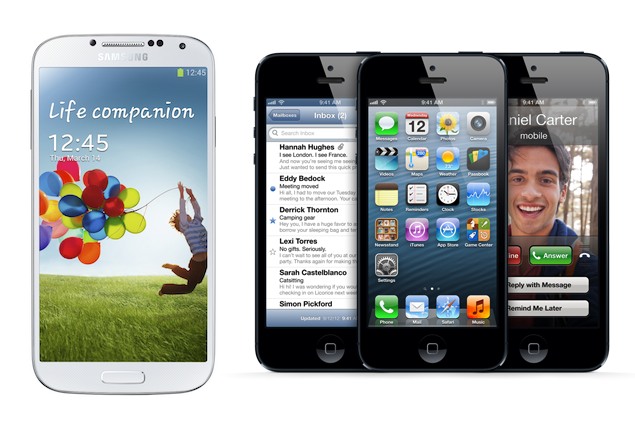
Samsung Galaxy S IV, or Galaxy S4 as Samsung has been calling it so far, was officially unveiled Thursday at an event accompanied by a live orchestra while an audience of thousands watched the theatrics unfold on a four-level stage.

The Galaxy S4, which crams a 5-inch screen into body slightly smaller than the S III's, will go sale starting April. Samsung didn't say what the phone will cost, but it can be expected to start at $200 with a two-year contract in the U.S. That's comparable to the iPhone 5.

JK Shin, the executive in charge of Samsung's mobile communications division, promised the money would be well spent for a "life companion" that will "improve the way most people live every day."

That bold promise set the tone for the kind of flashy presentation associated with the showmanship of Apple, the company that Samsung has been trying to upstage. Apple contends Samsung has been trying to do it by stealing its ideas - an allegation has triggered bitter courtroom battles around the world.

One way Samsung and other makers of Android phone have been one-upping Apple is by increasing the screen size. Every successive generation of the Galaxy line has been bigger than the one before. The S III sported a screen that measures 4.8 inches on the diagonal, already substantially larger than the iPhone 5's 4-inch screen. The S4's screen is 56 percent larger than the iPhone's.

Apart from the larger screen and upgraded processor, the S4 has a battery that's 20 percent larger than that of the S III. Samsung didn't say if that translates into a longer battery life - the added capacity might be gobbled up by the bigger screen or other internal changes.

The S4 comes with a built-in infra-red diode, so it can control an entertainment center as a universal remote. This is a feature that has showed up in Android tablets before.

The S4 comes with several new technologies intended to help users interact with the phone. For instance, the screen now senses fingers hovering just above the screen, and some applications react. The Mail application shows the first few lines of an email when a finger hovers above it in the list, and the Gallery application shows an expanded thumbnail.

Users can control some other applications by making gestures in the air above the phone. In the browser, you can command the screen to scroll up by swiping from top to bottom a few inches from the phone.

The Camera application can now use both the front and rear cameras simultaneously, inserting a small picture of the user even as he's capturing the scene in front of him.

When several S4s are in close proximity, they can link up to play the same music, simultaneously - perfect for headphone dance parties.

The Galaxy S4 also will include a tool that enables users to create a dividing line so part of the phone is devoted exclusively to work while the other part is filled with personal information and photos. The feature is similar to a function on the latest BlackBerry - an indication that Samsung is going after other smartphone makers besides Apple with its latest model.

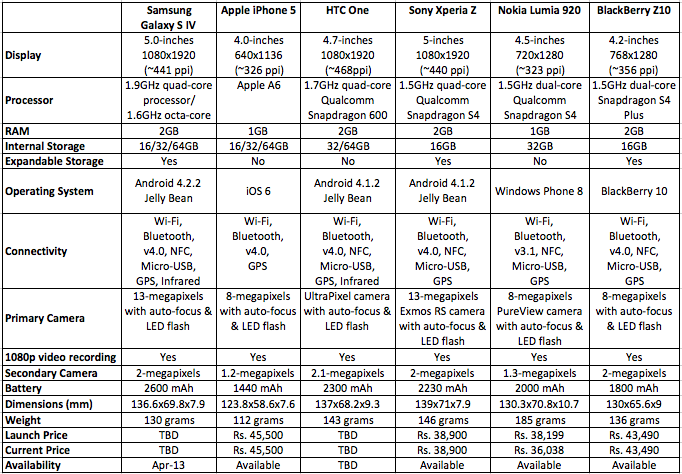
Let's take a look at how Samsung Galaxy S4's specifications compare to Apple's iPhone 5 and the rest of its competition.